Search
Guaranteed safe online shopping at www.aaaremotes.com

Stanley Gate & Garage Opener
Wireless Keypad STAKP (No Cover)

Stanley Gate & Garage Opener Wireless Keypad STAKP (No Cover)

Sku: STAKP
Price: $54.99

This item has been discontinued and is no longer available.

The compatible replacement for this item is the LiftMaster 387LM Universal Wireless Keypad.

Email a Friend


Stanley Gate & Garage Opener Wireless Keypad STAKP (No Cover)
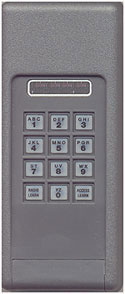
  • Stanley garage door opener wireless keypad model STAKP compatible with all Stanley formats
  • The Stanley wireless keypad is an exterior mounted keypad that functions essentially like a remote
  • 310 Mhz frequency, compatible with ALL Stanley Digital (dip switches) products and compatible with the Stanley SecureCode format (uses a "Smart" button for coding)
  • Convenient keyless entry system installs in seconds (just 2 screws)
  • Back lit keypad for night time use, weather proof
  • 1 year manufacturer warranty
  • Also available in white with a cover Digi-Code DC5202 (works with 10 dip switch openers only).
Stanley Wireless Keypad STAKP Programming Instructions
For detailed instructions & troubleshooting, Click here.


Programming the Stanley STAKP Wireless Keyless Entry System
(follow these steps from left to right)

To Change the Access Code:

1. Begin by clearing the keypad by pressing and holding the Access Learn and Radio Learn buttons together for 10 seconds or until the LED indicator light goes out.
2. Access Learn 3. Access Learn 4. 1-2-3-4
(Default Code)
5. Enter new 4 digit PIN number
(Access Code)
6. Access Learn

Determine if your machine has Dip Switches or if it is SecureCode

If your machine is SecureCode, skip down to "SecureCode: Programming the Radio Code".

DIP SWITCHES: Programming the Radio Code

7. The Radio Code (dip switches) for the following example according to the image is 1-3-4-6-7-8-0 (10 being zero "0"). To determine the Radio Code, choose the dip switches that are currently in the CLOSED or ON position. Do NOT use the switches in the OPEN or OFF position.
8. Radio Learn 9. Radio Learn 10. Enter the new Access Code
(this step may not be necessary for some keypads, if your keypad does not work after programming using this step, go back to the beginning of "Programming the Radio Code" and skip this step)
11. Enter the Radio Code
(dip switch settings)
In this case, it would be
1-3-4-6-7-8-0
12. Radio Learn

Then, skip down to step #14 below.

SECURECODE: Programming the Radio Code

7. Radio Learn 8. Radio Learn 9. Enter the new Access Code
(this step may not be necessary for some keypads, if your keypad does not work after programming using this step, go back to the beginning of "Programming the Radio Code" and skip this step)
10. 0 - 0 - 0 - 0
(zero 4 times)
11. Radio Learn
12. Press and release the REMOTE or "R" or LEARN button 13. Enter the Access Code 14. Press ANY key on the CodeKey keypad. This will activate the opener for 2 to 10 minutes. After 2 to 10 minutes, you should be able to enter the access code to open/close your garage door.
Quick Remote Search
Manufacturers

By Category

Knowledge Base  

Information  

Store Hours  Click here to open
Tech Talk Ask the Pros

Verified by Visa

ecommerce provided by Yahoo! Small Business Official PayPal Seal